Emergency Offline Google Map Download Now
Imagine being stuck in an unfamiliar place with no internet connection, weak signals, or a sudden emergency. Maybe you’re traveling, hiking, or dealing with a power outage after a natural disaster. In moments like these, navigation can quickly become stressful.
That’s where offline Google Maps becomes a lifesaver.
By downloading maps in advance, you can still navigate roads, find locations, and reach safety even without internet access. In this guide, you’ll learn how to download emergency offline maps, why they’re essential, and how to use them effectively.
What Is Offline Google Maps?
Offline Google Maps allows you to download specific map areas directly to your phone so you can access them without an internet connection.
This means you can still:
- View maps
- Search locations within the downloaded area
- Get turn-by-turn driving directions
- Find roads and landmarks
The feature is built into the google maps mobile app and works on both Android and iPhone.
However, some features like live traffic updates and public transit directions require internet access.
Why Download Google Maps for Emergencies?
Many people only think about offline maps when traveling abroad. But they’re equally important for emergency preparedness.
Here are some situations where offline maps can help:
1. Natural Disasters
During earthquakes, floods, or storms, mobile networks often fail. Offline maps help you:
- Locate safe routes
- Avoid blocked roads
- Navigate evacuation paths
2. Remote Travel
If you’re hiking, camping, or driving through rural areas, internet signals may disappear.
Offline maps ensure you never lose navigation access.
3. Power Outages
Large blackouts can disrupt mobile networks. Having maps downloaded keeps navigation available when it matters most.
4. International Travel
Roaming data can be expensive or unavailable. Offline maps allow navigation without costly data usage.
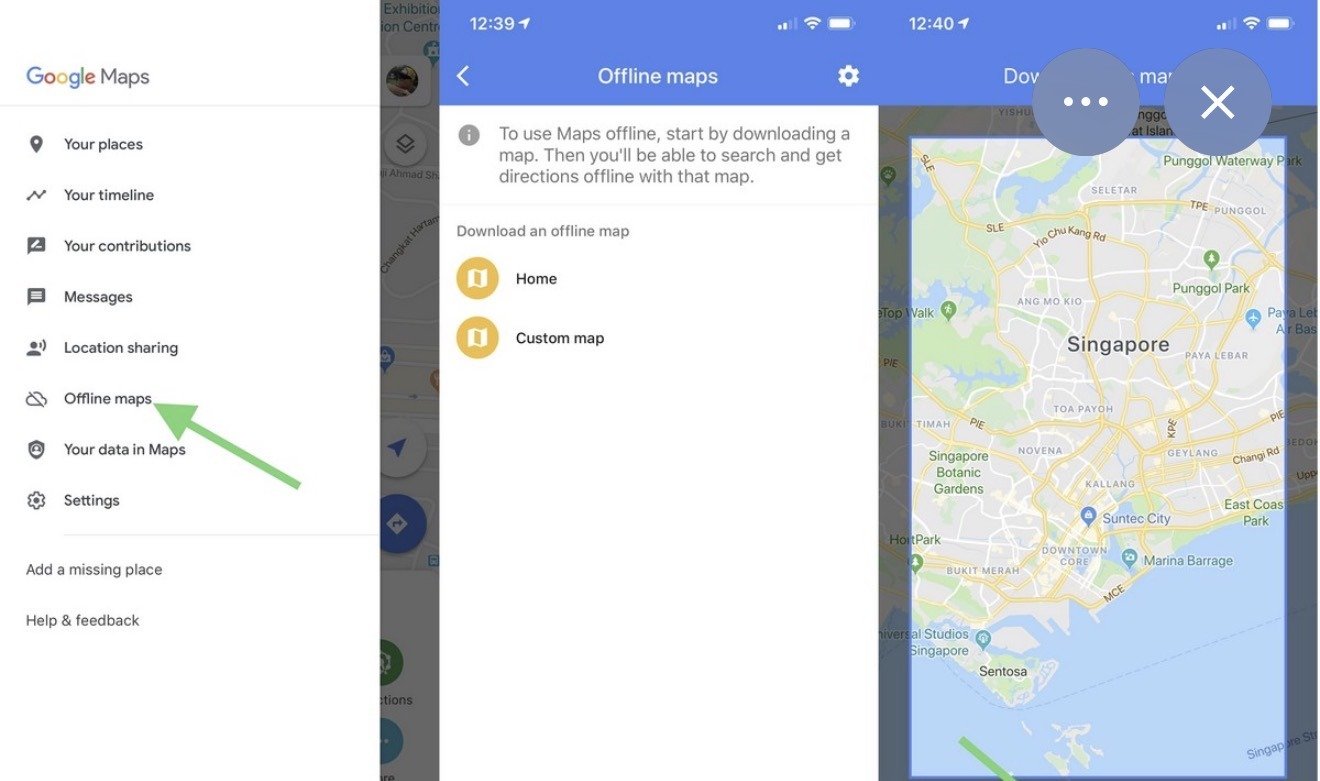
How to Download Google Maps Offline (Step-by-Step)
Downloading offline maps takes less than a minute.
Step 1: Open Google Maps
Launch the Google maps app on your smartphone.
Make sure you’re connected to Wi-Fi for faster downloads.
Step 2: Search for a Location
Type the name of a city, region, or area you want to download.
Example:
- New York
- Islamabad
- Swat Valley
Step 3: Tap the Location Name
After searching, tap the location name at the bottom of the screen.
Step 4: Select “Download”
Scroll and tap Download.
Google Maps will show the area size and storage space required.
Step 5: Adjust the Map Area
You can zoom in or out to adjust the download area.
Then tap Download again.
The map will now be saved on your phone for offline use.
How to Use Google Maps Without Internet
Once your map is downloaded, you can use it even without data.
Simply:
- Open google maps
- Search for places within the downloaded area
- Tap Directions
- Start navigation normally
GPS still works offline, so your phone can track your location.
Tips for Using Offline Maps Effectively
Download Maps Before Traveling
Always download maps before leaving home or entering low-signal areas.
Update Your Offline Maps
Offline maps expire after about 30 days. Updating ensures roads and locations stay accurate.
Download Large Areas for Safety
If preparing for emergencies, download:
- Your city
- Nearby highways
- Surrounding regions
This provides broader coverage if you must travel farther.
Check Storage Space
Offline maps can take hundreds of megabytes, depending on area size.
Ensure your phone has enough storage.
Limitations of Offline Google Maps
While powerful, offline maps have a few restrictions:
- No real-time traffic updates
- No transit or cycling directions
- No live business hours
- Limited route alternatives
Despite these limitations, they remain one of the most reliable emergency navigation tools available.
Final Thoughts
Downloading Google Maps for offline use is one of the simplest yet most effective ways to prepare for unexpected situations.
Whether you’re traveling, exploring remote areas, or planning for emergencies, offline maps ensure you always have access to navigation when the internet disappears.
Take a few minutes today to download the areas you visit most often. In a critical moment, that small step could save time, stress, and possibly even lives.